
Count the photos you actually need to deliver
A virtual staging budget starts with a list of final photos. A room can use one view, two angles or no staged image at all. Start with the property’s listing folder and flag the photographs where furniture answers a question: where a bed could go, whether the dining area can seat a family or how people would move from the entry to the seating area. Leave the other listing photos in the ordinary photography or enhancement budget.
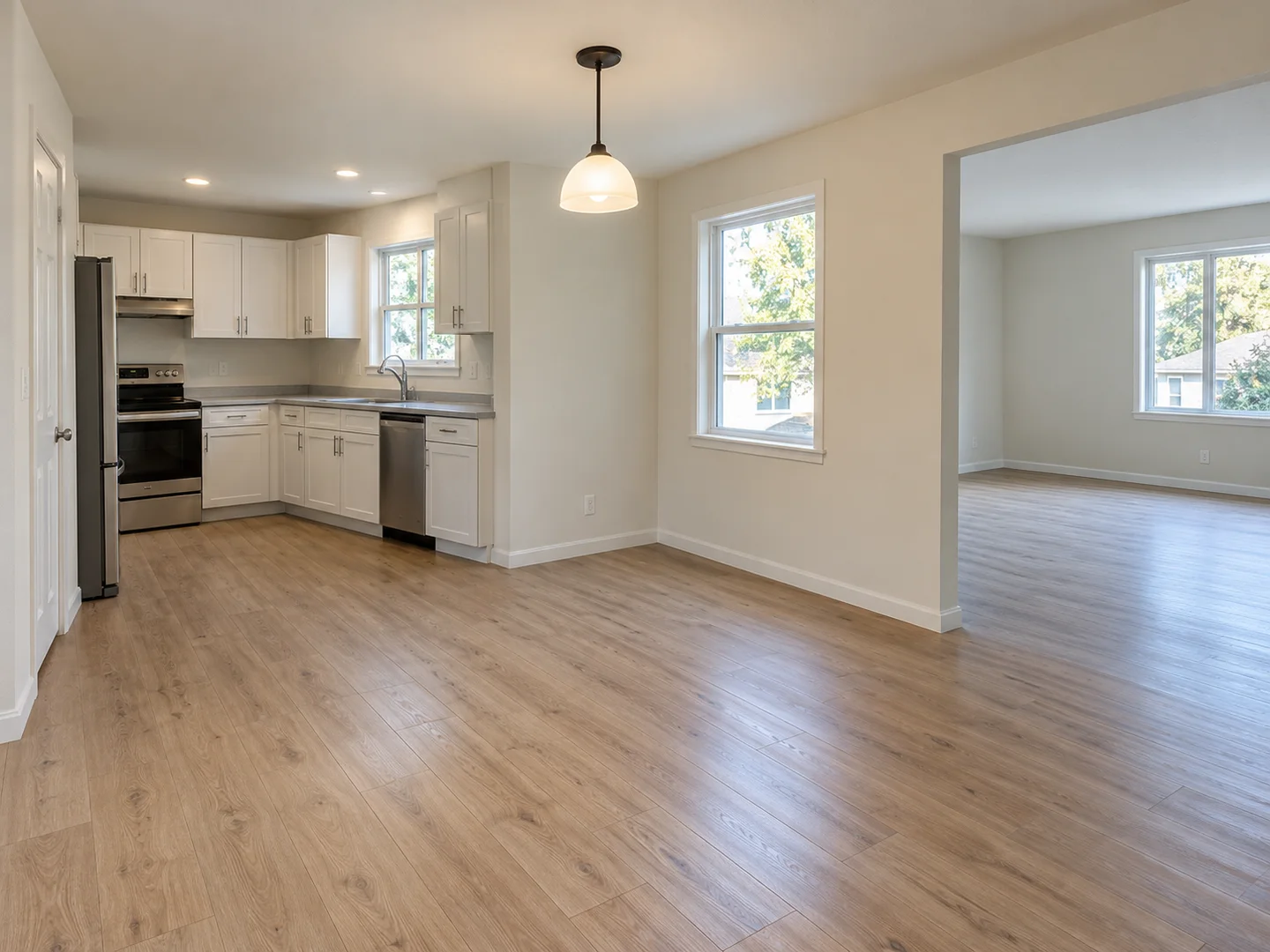
For a small condo, a hypothetical four-view list might contain the living area, dining nook, main bedroom and spare room. The dining image below shows why a second view might add little. A single frame already shows both the table area and the opening into the next room. If the seller asks for a second angle with the same furniture, put that request on its own line. It is a separate deliverable with a continuity requirement.
Specify who will approve each view and what would cause rejection. For the dining room, retain the opening and fixed light, keep the route clear, and compare the final frame to the original. A handoff with those checks is easier to estimate than a request to stage the whole property.
Translate the request count into cash today
In RealtyPhoto, a planned submission uses 1 credit per image at the current public rate. Add the selected views and the deliberate extra submissions you are willing to make, then multiply by that rate. Subtract only the credits you expect to be usable when the photos are processed. If the balance covers the plan, the estimated pack purchase today is zero. If it falls short, the remaining requirement has to be covered with whole packs.
Read the calculator in two passes. First look at the shortfall and the combination of packs that covers it at the lowest catalog cost. Then look at the credits remaining after all planned requests. A larger pack can have a lower advertised cost per credit yet require more cash upfront for a small gap. Any unused credits are capacity for later requests. The purchase amount is the cash leaving your account now.
The three examples model a small condo, a family listing with two credits already available and a portfolio of model units with a shared usable balance. The table recalculates from the current catalog and rate. Use the fields to match your own brief, including any deliberate second pass. This is a budget for submissions and a ceiling you can revise after reviewing results.
Set your request and cash ceiling
Enter credits you can use for this project. This tool does not read your account, submit images or buy packs.
Use whole numbers. Each planned image request uses 1 credit(s). Extra submissions are your allowance for new requests, not a predicted failure rate.
$12.00 estimated pack purchase today
- Planned submissions
- 5
- Credits required
- 5
- Credit shortfall
- 5
- Whole packs
- 1 × 10-credit pack
- Credits left after this plan
- 5
Catalog estimate in USD, allowing repeated packs. It is a planning limit, not a checkout quote or a promise of usable results. Confirm the current price, available packs and usable balance before processing.
Check current packs and billingWhole-listing budget examples
Illustrative projects, not customer results. Actual purchases use whole packs; quantities and prices below follow the current catalog.
| Plan | Usable balance | Credits needed | Packs to buy | Cash today | Credits left |
|---|---|---|---|---|---|
| Small condo. 4 selected + 1 extra | 0 | 5 | 1 × 10-credit pack | $12.00 | 5 |
| Family listing. 9 selected + 2 extra | 2 | 11 | 1 × 10-credit pack | $12.00 | 1 |
| Model-unit portfolio. 25 selected + 6 extra | 5 | 31 | 3 × 10-credit pack | $36.00 | 4 |
Current catalog: 10 credits for $12.00; 25 credits for $27.50; 50 credits for $50.00. Buying a larger pack is not always the cheapest way to cover a particular shortfall.
A revision can cross a pack boundary
Take the family listing in the table. There are nine desired views and two credits already on hand. The listing manager budgets two new submissions, perhaps to correct a layout in the living area and try a different crop of the spare room. At the current rate, check the cash estimate with two extra submissions, then set the extra field to four. The added submissions can take the shortfall past the capacity of the smallest pack.
Before buying the next pack, identify which view is worth another request. If the first version moved a doorway or blocked the walkway, name that problem in the next brief and keep the rejected version out of the delivery folder. If the original misses the opening completely, reshoot the room before trying again. If an approved version already meets the brief, remove the extra attempt from the plan.
A deliberate submission is a fresh request. A technical failure is a separate situation. Check the task status and the balance before sending the same image again, especially if the first job is still pending. Keep the worksheet’s allowance for intentional requests and reconcile the actual balance after review.
Compare a vendor quote with the same delivery brief
A per-image service quote answers a different budgeting question. You are paying for the ordered image and the work included in that service. Record the number of files, the deadline, how changes are requested and whether an additional view or a new source file is billed separately. Ask about a furnished source, furniture removal and same-furniture views before relying on an empty-room rate.
For two published U.S. examples, BoxBrownie lists US$30 per image for virtual staging and describes a two-month window to request changes to the original job. Styldod lists US$23 per image below eight images and US$16 per image at eight or more, with revision and rush terms on its service page. Those terms belong to the named services. Confirm the checkout scope before using either number in a client estimate.
With nine standard views at the listed rates, the service line would be $270 at BoxBrownie or $144 at Styldod before any extras or tax. A nine-view self-service budget instead includes the cash for whole packs plus the time to brief, submit and review the images. The quotes buy different work. Record the approval and correction responsibility in each option before comparing the totals.
Compare the same handoff
| Cost item | Self-service staging | Per-image staging service |
|---|---|---|
| Charge basis | Credits for each submitted photo, covered by whole packs if needed | Quoted order line for each delivered image |
| Another pass | Budget deliberate new submissions and review time | Check revision window, new source and change-of-scope terms |
| Several views of one room | Review each output independently for continuity | Ask whether matching furniture across angles is included |
| Deadline and approval | Allow time to submit, review and hand off files | Confirm turnaround, rush fee and who approves delivery |
Keep review time and extra deliverables on separate lines
One model-unit portfolio might need twenty-five finished views spread across several units. Have the team approve a representative room first, then assign the rest of the views and an owner for quality review. Track the unit, room, source filename and whether the furniture needs to match any other view. Independent AI requests may show different furniture even when they use the same style and prompt. Send continuity-dependent angles for a separate quote if the handoff requires a matched set.
Some jobs need a different line item even when the room is already in the staging brief. A reshoot is photography time. Delivering a photograph with a changed sofa in an occupied room may require dedicated removal or a different source. Furnishing a room for an in-person viewing requires physical staging and its own quote. Keep those items outside the credit calculation so the photo estimate stays auditable.
Write an approval rule before committing the balance. For instance, reserve one deliberate extra submission for a cover image, and stop on the remaining angles when an original already tells the story. On delivery, record approved files, actual spend, usable credits carried forward and any disclosure required by the listing channel. Divide cash by the number of approved views only if you also keep the unused balance visible. That number describes this project’s cash outlay, separate from the pack’s per-credit rate.
Before approving the budget
Keep one worksheet with the listing brief, review notes and approved files.
Download the listing budget worksheet (.txt)