
Choose the next action for the actual problem
Write one sentence about what the picture needs to explain. For an empty bedroom, that might be a plausible bed position with access to the closet. For an occupied living room, it might be the existing seating arrangement in clearer light. If the purpose is already obvious, another furnished version may add little. Select images by that purpose rather than staging one photo of every room automatically.
Judge the source before buying credits. You should be able to follow the walls, windows, fixed fittings and floor edges. An attractive generated arrangement cannot establish a room's dimensions, fix a missing view or prove that a particular bed fits. Use real measurements for a fit question. Use the table to choose a first action; it is an editorial decision aid, not an assessment of resale value.
A first-action decision table
| Situation | What the source shows | Useful first action | What would justify continuing |
|---|---|---|---|
| Empty, clear room | Layout or purpose is hard to picture | Pilot one Virtual Staging view | Furniture explains use; architecture and access survive review |
| Furnished, readable room | Existing furniture already explains the layout | Tidy and photograph; consider Interior enhancement | A faithful image becomes easier to read |
| Blur or unreadable features | Important details cannot be verified from the source | Retake or obtain a better original | A clear source supports an honest comparison |
| Viewing needs real changes | Furniture or clutter obstructs the actual space | Physical preparation or a staging consultation | Visitors can experience the intended arrangement |
Scenario 1: an empty bedroom with a layout question
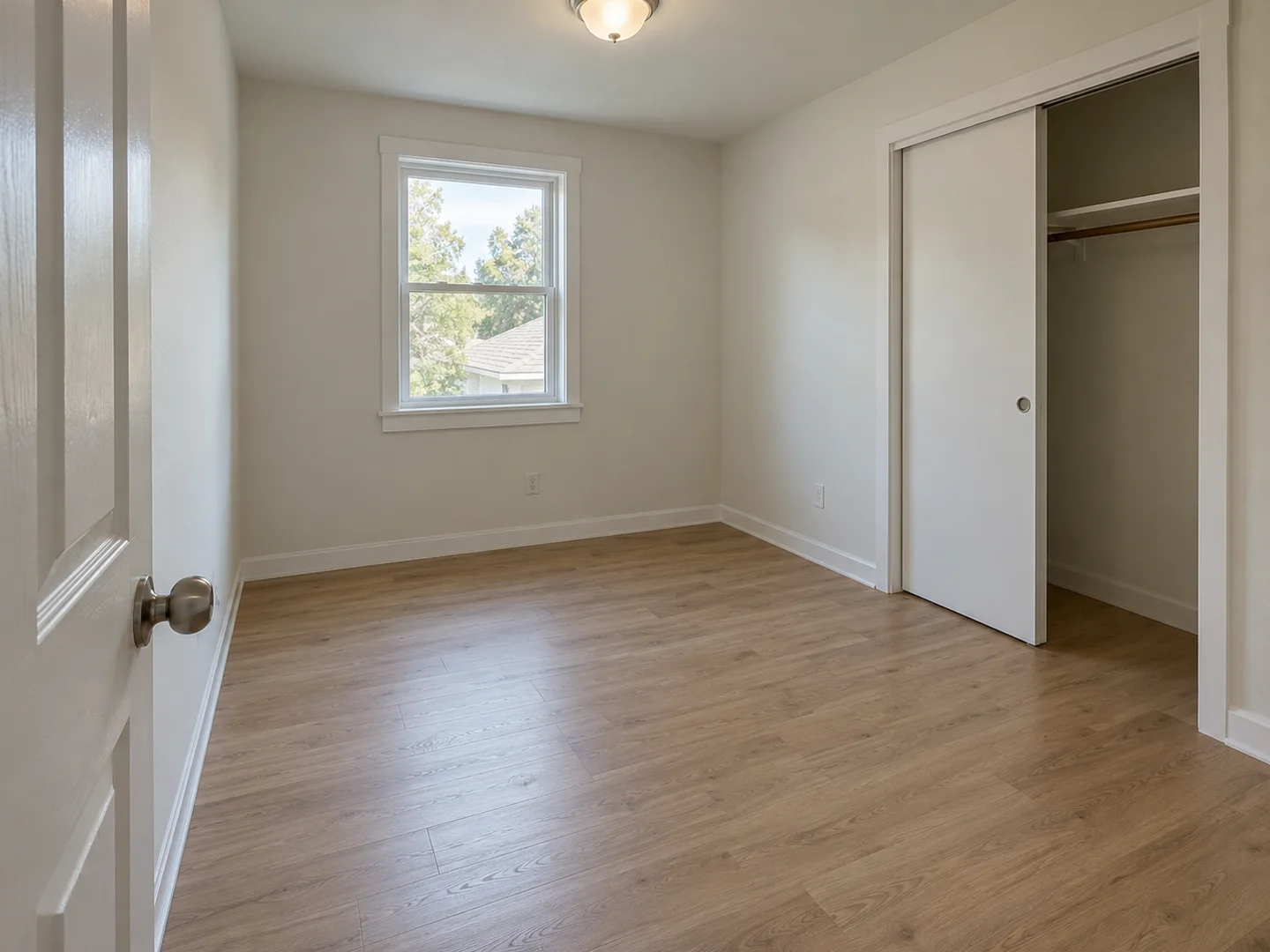
This small empty room shows a door at the left edge, a window ahead and an open closet on the right. A furnishing proposal could help explain a sleeping area while retaining a visible route to the closet. That is a specific reason to try staging. It is not evidence that a king bed, two nightstands or a desk will fit; the scene has no verified measurements.
Start with this single view rather than submitting several angles at once. Choose Virtual Staging and a restrained style such as Minimalist or Scandinavian. A useful optional prompt is: add a simple bed arrangement while keeping the existing window, entry and closet opening visible. A prompt guides generation; it does not lock the furniture footprint or protect architecture automatically.
Review the first result against the source. Can you still identify the same closet opening and window frame? Does the proposed furniture leave a credible route through the room, without making the room appear wider? Reject a result that invents a wall, closes the closet or hides a changed corner. Keep a good image only if it answers the original layout question more clearly. For detailed bed and door checks, follow the bedroom guide below.
Scenario 2: a furnished living room needs preparation first
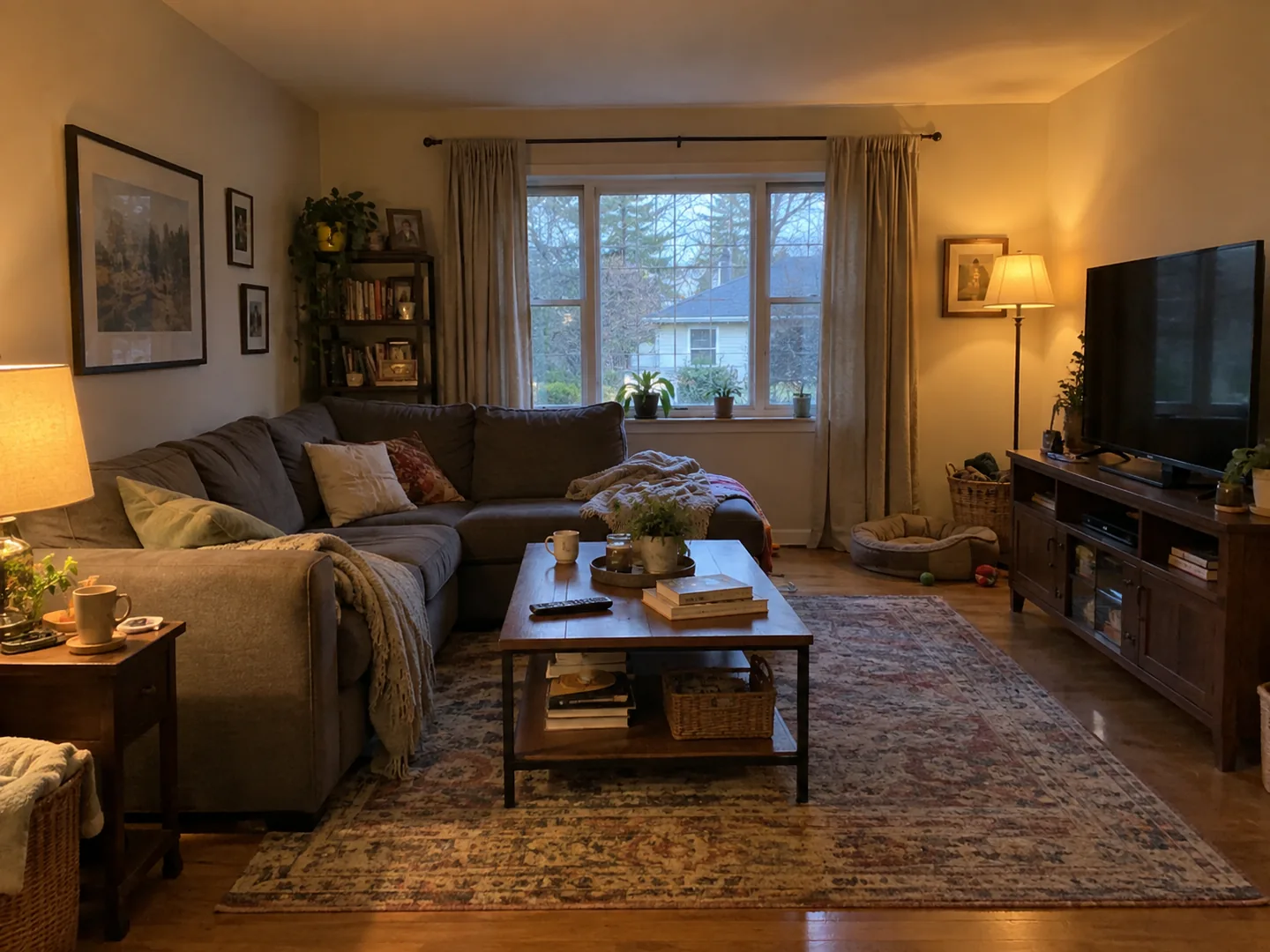
The sectional sofa, coffee table and television already explain how this room is used. Books, throws, cups and small objects compete for attention, while warm lamps and cooler window light give the image mixed colors. Adding more furniture would not solve those issues. The first useful work is deciding what should remain in the actual photograph.
For a comparable occupied listing, tidy surfaces, remove private items and photograph the existing arrangement clearly. If the layout is suitable and the source records it well, evaluate Interior enhancement for exposure and natural color. This does not promise that every small object will survive an edit; check them. RealtyPhoto has no dedicated furniture-removal control and should not be budgeted as a guaranteed replacement of an occupied room's contents.
If the real seating blocks circulation, rearrange it before the next shoot or ask a physical stager for a scoped consultation. If the furniture itself is included in a rental, keep the advertised inventory accurate. A digitally furnished alternative would create a different communication problem if a guest or buyer expects those items to be present. In this scenario, a decision to spend zero staging credits can be the useful outcome.
Scenario 3: a dark bedroom needs a source check
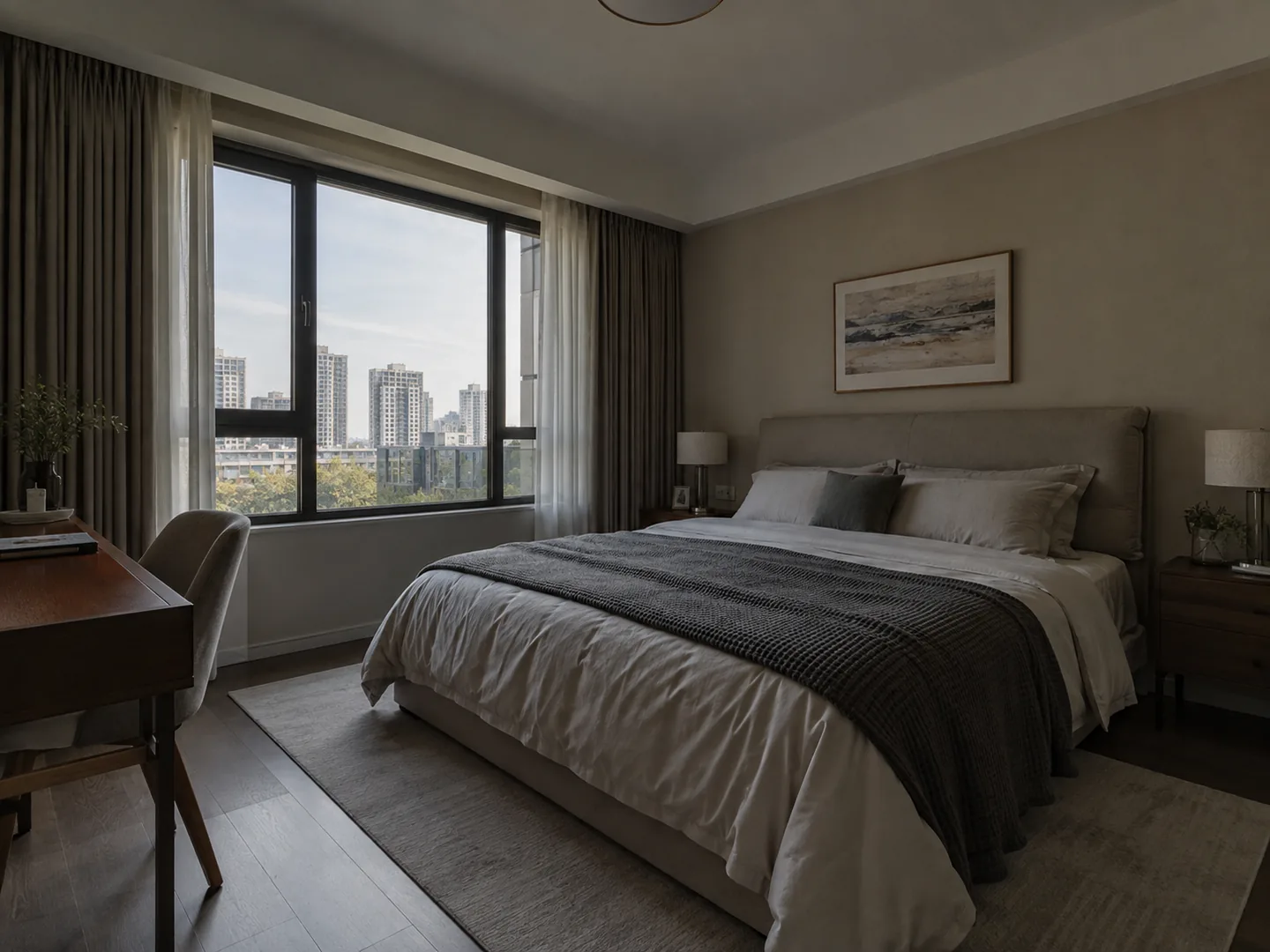
The bed and desk are already visible in this image, so room use is not the missing information. The darker bedding, shaded corners and much brighter window are the issue. Inspect a comparable original at full size: can you distinguish fabric and furniture edges, follow the window divisions and see the wall junctions? Do not mistake a convincing generated texture for detail actually captured by the camera.
If the original is sharp and its important features are readable, try a restrained Interior enhancement and compare the same references afterward. If motion blur, heavily obscured corners or a featureless window prevents an honest comparison, obtain another exposure or a new photograph. The editor does not offer manual local masks, RAW development or multi-exposure HDR merging. It cannot verify a view missing from the original.
For a retake, simplify the lighting, keep the phone level and choose an exposure that records the room's important features. Keep another useful angle when a single frame cannot explain the space. The iPhone guide below covers capture and supported exports. Staging should wait until the photo itself is a trustworthy source; otherwise every furnishing attempt adds another result to review without resolving the uncertainty.
Budget a small pilot before the whole listing
Count selected photographs, not bedrooms. Two angles of one room are two image requests. Begin with one representative empty view; expand only after reviewing it. In the planner below, extra submissions mean new generations you deliberately allow for another style or a revised request. They are not a predicted failure rate or a statement about automatic internal retries and credit restoration.
Current processing uses 1 credit per image. The examples and planner read the current credit-pack catalog rather than estimating a fractional purchase. Cash needed today depends on the shortfall after your usable balance and the cheapest combination of whole packs. Leftover credits are a balance for later requests, not a refund or a reduction of today's purchase. Purchased credits do not expire; check any trial credit's availability and expiry in your account.
Set a review-time allowance separately. If you choose three minutes per generated image for an initial pass, five results mean fifteen minutes before any corrections or upload work. Those numbers are a planning assumption you can replace, not a measured processing or review benchmark. Do not infer that five submissions will yield five publishable images. Stop when the agreed request or time limit is reached, even if you still have credits.
Set your request and cash ceiling
Enter credits you can use for this project. This tool does not read your account, submit images or buy packs.
Use whole numbers. Each planned image request uses 1 credit(s). Extra submissions are your allowance for new requests, not a predicted failure rate.
$12.00 estimated pack purchase today
- Planned submissions
- 5
- Credits required
- 5
- Credit shortfall
- 5
- Whole packs
- 1 × 10-credit pack
- Credits left after this plan
- 5
Catalog estimate in USD, allowing repeated packs. It is a planning limit, not a checkout quote or a promise of usable results. Confirm the current price, available packs and usable balance before processing.
Check current packs and billingThree budgets from a zero balance
Illustrative projects, not customer results. Actual purchases use whole packs; quantities and prices below follow the current catalog.
| Plan | Credits needed | Packs to buy | Cash today | Credits left |
|---|---|---|---|---|
| 3 selected + 2 extra | 5 | 1 × 10-credit pack | $12.00 | 5 |
| 12 selected + 3 extra | 15 | 2 × 10-credit pack | $24.00 | 5 |
| 20 selected + 4 extra | 24 | 1 × 25-credit pack | $27.50 | 1 |
Current catalog: 10 credits for $12.00; 25 credits for $27.50; 50 credits for $50.00. Buying a larger pack is not always the cheapest way to cover a particular shortfall.
Use physical preparation when the viewing is the problem
Virtual furnishings exist in the photograph. They do not provide seating for an open house, remove an oversized sofa from a hallway or let someone experience a furnished room in person. If a listing needs those changes, request a local staging or preparation scope. Compare what is actually included: consultation, moving existing items, furniture hire, installation, removal and the period covered. No local service price is assumed here.
The approaches can also serve different parts of one listing. You might prepare a furnished living area physically and illustrate an empty spare room digitally. Keep the original empty photograph available and identify the virtual furniture clearly. Confirm the destination listing's current disclosure and image requirements before publishing; this guide does not approve an image for every MLS or portal. The comparison linked below explains the two scopes in more detail.
Read staging research without turning it into an ROI promise
In its 2025 Profile of Home Staging, NAR reports that 83% of buyers' agents said staging helped buyers visualize a property as a future home. The US trade association surveyed REALTORS® in February 2025. This is reported opinion about home staging generally. It does not isolate AI virtual staging, test RealtyPhoto or establish a causal increase in your listing's sale price.
Use the finding to frame a question about visual understanding, not to multiply a property's value by an advertised uplift. A practical pilot asks whether the image communicates its intended use while preserving the property. If you later compare listing performance, record the dates, price changes, season and other marketing changes. An increase in inquiries alongside a photo change alone cannot establish what caused it.
Run one view and make a keep-or-stop decision
Use the Virtual Staging editor below for an empty or mostly unfurnished source. Upload JPEG, PNG or WebP copies while retaining the originals; current limits are 20 MB per file, 4096 pixels on the longest side and 10 photos per batch. A batch shares its mode, style and optional prompt, so separate different briefs. Sign in or register when prompted and confirm the displayed balance and credit requirement before generating.
Compare the completed image with its own source, starting with walls, openings and fixed fittings, then furniture scale and access. Inspect the downloaded file as well as the preview. There is no promise of matching furniture across angles or reproducing a specified catalog item. If a result fails, record the reason before spending another request. Repeatedly changed architecture is a reason to stop and choose a clearer source or a human service.
For an acceptable result, retain its source, describe the digital furniture and follow the destination's current rules. NAR's consumer guide notes that materially altered photo enhancements should be disclosed. A useful editorial caption starts with 'Virtually staged: furniture and decor added digitally'; adapt it to what was actually changed and to the destination's requirements. Such a label does not excuse altered property features or replace any required original photo.
Your staging go-or-stop checklist
Use this before the pilot and again before expanding. Ticks are temporary; download the blank worksheet to keep the decision, budget and review record.
Download the decision and budget worksheet (.txt)